


Most brands open Google Search Console and see a wall of numbers. Professional SEO experts see a roadmap. The difference? Knowing how to turn clicks, impressions, CTR, and rankings into clear, actionable steps that actually drive growth.
If you’ve ever wondered how serious SEO services are run for growth‑minded companies across the U.S., this post will give you a peek behind the curtain. And if you want the full framework, you can grab our free SEO Action Guide at the end.
This guide includes the exact 4‑step process we use to turn Google Search Console reports into revenue‑driving insights.
Listen to this Post
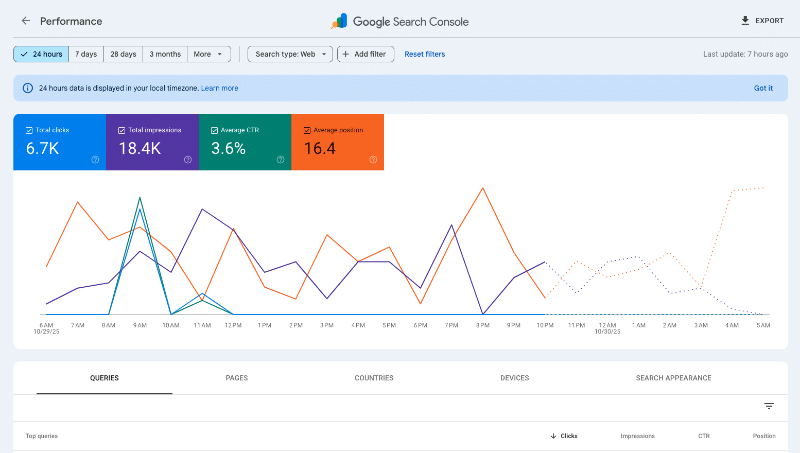
Why Most Google Search Console Reports Fall Flat
Let’s be honest. A lot of businesses glance at their Google Search Console dashboard and move on. But raw data doesn’t grow revenue. What matters is how you interpret it.
- Clicks show what’s already working.
- Impressions reveal hidden opportunities.
- CTR tells you if your message is connecting.
- Position shows how close you are to winning page one.

Did you know? That according to Backlinko, the average CTR for position 1 on Google is 27.6%, while position 10 drops to just 2.4%. If you’re not optimizing for CTR, you’re leaving traffic on the table.
Download The Action Guide, where we show you exactly how to layer these metrics for maximum impact.
The 4‑Step SEO Action Plan From Google Search Console
Here’s the same process professional SEO teams use to turn reports into results:
- Defend & Expand (Clicks)
Double down on the keywords already driving traffic. Build supporting content and strengthen calls‑to‑action. This is how you approach conversion optimization to maximize results. - Visibility Without Wins (Impressions)
Spot where you’re being seen but not chosen. Rewrite titles, add schema markup, or create new landing pages. - Snippet Optimization (CTR)
If you’re ranking but not getting clicks, your snippet needs work. Test new headlines and descriptions that highlight benefits and urgency.
Stat to know: According to Ahrefs, pages with meta descriptions get 5.8% more clicks than those without. - Low‑Hanging Fruit (Position)
Push keywords in positions 7–15 onto page one with internal links, fresh content, and backlinks.
Our downloadable guide includes a checklist for running this 4‑step plan every week, month, and quarter.
Choosing the Right Time Frame in Google Search Console
Not all data windows tell the same story:
- 7 days → Quick health check. Spot sudden drops or wins.
- 28 days → Monthly trends. Validate if changes are sticking.
- 3 months → Strategic view. See seasonality and long‑term growth.

Industry insight: HubSpot reports that 75% of users never scroll past the first page of search results. That’s why spotting “near‑page‑one” keywords in your 28‑day or 3‑month reports is critical.
Our Action Guide includes a reporting cadence template, so your team knows exactly which metrics to pull at each interval.
Why This Matters for U.S. Brands
Competition is fierce. Whether you’re an eCommerce store in Denver or a national service provider, the brands that win are the ones that treat Google Search Console as a system — not a guessing game.
By applying this framework, you’re not just chasing rankings. You’re building a repeatable process that compounds over time.
In Conclusion
SEO doesn’t have to feel like a mystery. With the right framework, your Google Search Console reports stop being numbers on a screen and start becoming a growth engine for your brand.
Download The Google Search Console SEO Action Guide

Subscribe below and we’ll send you the download link instantly, absolutely free!
(1 PDF file)
